This one assumes you're already comfortable building in n8n. If you haven't built a workflow before, start with the n8n Starter Pack first. This template builds on that baseline instead of teaching it.
You know the weekly review is a good idea. You've probably even set aside time for it before. What usually kills it isn't the review itself, it's the ten minutes of gathering that comes first. Open the calendar, scroll back through the week, check the task list, remember what actually happened, and by the time everything is in front of you the motivation is gone. So the review slips a week, then another, and eventually it stops being a habit you have.
This workflow removes the gathering. On a schedule, it pulls a summary of your past week together and drops it into Telegram. Sunday evening, or whenever you set it, a briefing is just there waiting. You read it instead of assembling it. The whole point is that the boring part happens without you.
What you'll need before starting
Three things.
The Telegram step trips up more people than the rest of this combined, mainly because a brand new bot won't respond to anything until you message it first. If you get stuck, Telegram's own bot setup walkthrough covers it directly, message BotFather, send /newbot, and follow the prompts.
What's inside the workflow
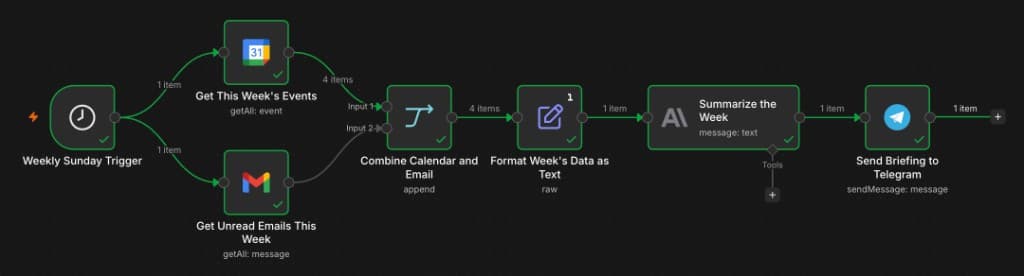
Six steps, in order.
Schedule trigger
fires weekly, on whatever day and time you set
Get calendar events
pulls the past week from your calendar
Get unread email
pulls unread messages from the same window
Combine and format
merges both into one plain-text block
Summarize
Claude turns the block into a short written briefing
Send to Telegram
the summary lands in your chat
Nothing in here is exotic. It's the same shape as most of the automations on this site, pull data, combine it, hand it to a model, send the result somewhere you'll actually see it.
What the 20 minutes actually involves
The setup is short, and here's roughly where the time goes.
What it actually sends
Here's a real one.
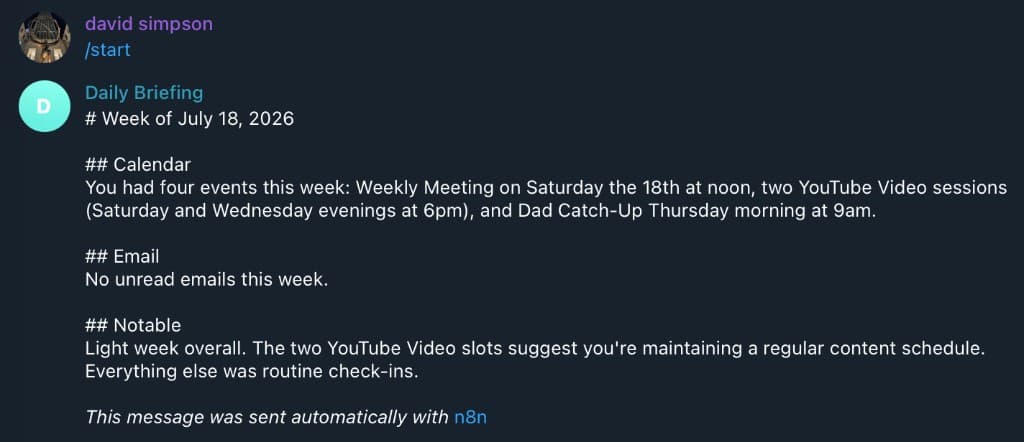
That's an actual week, not a mockup. Notice it didn't invent anything to fill space, the inbox was empty and it said so plainly instead of padding the message. Some weeks will have more in them. The point isn't that every briefing looks like this one, it's that whatever the week actually was, this is what shows up waiting for you.
One honest note
This is a summary tool, not an assistant. It pulls your week together and hands it to you in one place. It does not decide what matters, tell you what to work on next, or think about your priorities for you. The reading and the judgment are still yours. What it buys you is the five minutes of setup-per-week you were skipping, so the review actually happens. If you were hoping for something that makes the decisions, this isn't that, and it's better to know going in.
The workflow file itself is available to download below, drop it into n8n and swap in your own calendar and inbox.